Showing posts with label Windows 7. Show all posts
Showing posts with label Windows 7. Show all posts
Wednesday, September 28, 2011


Monday, August 15, 2011
Direct Download Links For Official Windows 7 SP1 Integrated Bootable Disc Images
Microsoft Windows 7 Service Pack 1 (SP1) is available for download since past few months now, the free SP1 update to Windows 7 was pushed as KB976932 via Windows Update publicly in February this year. Microsoft has now made available official direct download links to bootable Windows 7 SP1 integrated disc images in standard .iso format, these new SP1 slipstreamed images has the added advantage that users will have an up-to-date installation just after the initial setup.
 These direct download links are from Microsoft's official mirror provided by Digital River and allows users with the usual 30 days of evaluation time after which they need to activate using a legitimate key. These .iso files can be burnt as bootable DVD discs or bootable usb sticks as demoed here -
Official Windows 7 SP1 ISO Download Links (English) :
Official Windows 7 SP1 ISO Download Links (English) :
Monday, August 08, 2011
How to Make Windows 7 Genuine ?
Disclaimer : We’re only providing links available on the net and we DO NOT support any piracy, cracks, hacks, patch etc. If anyone finds this post assaulting or having piracy, kindly contact through the contact page for further settlement of disputes. We encourage visitors to buy GENUINE WINDOWS 7 SOFTWARE!
After Microsoft applied WAT technologies to their Windows 7 OS, users started complaining that their genuine Windows 7 systems are becoming non-genuine. One way to circumvent this problem, is if you’re a non-genuine user of Windows 7 is to use Windows 7 loader. I’m not sure how this works, but it’s kind of a crack, hack, patch which dodges the WAT technologies into thinking that Windows 7 is genuine. This works for Windows 7 Ultimate as well.
There are several torrents on the net where you can find this Windows 7 Loader software. Thepiratebay.org is one such site, which offers relatively good torrents.
If you search that site using “windows 7 loader” you can find torrent links to different versions of the same like Windows 7 Loader 1.9.7, Windows Loader 1.9.9 etc. The present version is 2.0. This loader also helps to download Windows updates and the new version even works on Windows 7 SP1.
Windows Loader 1.9.7
Windows Loader 2.0
Windows 7 Loader Extreme Edition 3.503
 Please read the detail information after downloading the torrent on how to apply the loader and solutions for any further problems you face to make Windows 7 genuine.
As you can see in the System window from the Control Panel that your Windows is activated message is displayed with the Product ID number.
Disclaimer: Please buy & use ORIGINAL WINDOWS 7 SOFTWARE.
After Microsoft applied WAT technologies to their Windows 7 OS, users started complaining that their genuine Windows 7 systems are becoming non-genuine. One way to circumvent this problem, is if you’re a non-genuine user of Windows 7 is to use Windows 7 loader. I’m not sure how this works, but it’s kind of a crack, hack, patch which dodges the WAT technologies into thinking that Windows 7 is genuine. This works for Windows 7 Ultimate as well.
There are several torrents on the net where you can find this Windows 7 Loader software. Thepiratebay.org is one such site, which offers relatively good torrents.
If you search that site using “windows 7 loader” you can find torrent links to different versions of the same like Windows 7 Loader 1.9.7, Windows Loader 1.9.9 etc. The present version is 2.0. This loader also helps to download Windows updates and the new version even works on Windows 7 SP1.
Windows Loader 1.9.7
Windows Loader 2.0
Windows 7 Loader Extreme Edition 3.503

How_To_Make_Windows_7_Genuine
As you can see in the System window from the Control Panel that your Windows is activated message is displayed with the Product ID number.
Disclaimer: Please buy & use ORIGINAL WINDOWS 7 SOFTWARE.
Windows 7 Genuine Advantage
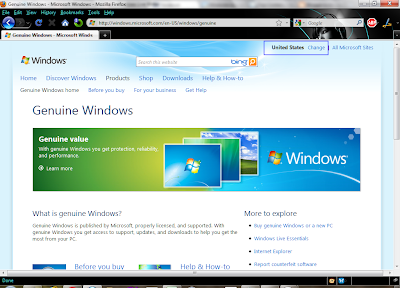
Recently, I’ve been checking about my Windows 7 genuine validity, by visiting the microsoft genuine website. To my unexpectedness, I found that the page showing the genuine validity of Microsoft OS has changed. I am using Windows 7, which I downloaded from piratebay and applied the crack, is still showing genuine on my computer as shown in the below image.

I found some of my visitors to my site, commenting that the crack or hack is not working. Though I’m not sure what the problem is, I would request to check the below screenshot.
 This is the genuine page for US on visiting the Microsoft OS genuine website. The page will be different for different countries. This is different from the earlier page you used to get on visiting the genuine site.
Download Microsoft Essentials – You can download the free anti-virus product from Microsoft from free, when you computer is tagged genuine by the Microsoft genuine website.
Home – If you visit the home page, you get access to various other software products.
Windows Media Player (WMP) – Once you’re using Windows 7 genuine, you are liable to download various WMP software and components. You get access to WMP 12. You can have more Windows Media downloads by visiting this page – Download Link.
Windows 7 Themes – You can download various official themes related to Windows 7. The themes are arranged in different categories – New themes, Animals, Art and entertainment, Automotive, Nature, Holidays and seasons, Places and landscapes, Branded themes etc.
Desktop backgrounds (wallpaper) – By default, themes come with only a few wallpapers. But if once you’re genuine, there are various official wallpapers you can download from the site. They are similarly categorized just like themes – Animals, fish and bugs, Art and entertainment, Holidays and Seasons, Natures, plants, and flowers, Places and landscapes etc.
Desktop and Sideshow gadgets – Windows 7 offers a good sidebar. You can place different gadgets on this sidebar. If you’re PC is genuine, you have the choice to download various desktop and sidebar gadgets. They too are categorized as – Featured desktop gadgets, Top downloads, Top Rated etc.
Windows Live Gallery – There are even more gadgets in the Windows Live Gallery link.
Internet Explorer 9 Beta – With the rich experience of Windows 7, you can explore the new beta features of IE 9 Beta. By default, IE8 comes with Windows 7 genuine, but you can try the new IE versions.
Compatible Software, Drivers, Downloads etc – Once you’re genuine, you’ll get access to different compatible software, device drivers like for eg. printer drivers and downloads. In the hardware section, you can access compatible drivers for cameras & photo, printers & scanners, MP3 & media players, TV devices, communication devices, mice, keyboards & Input devices, displays, monitors, networking, graphic cards & components, storage devices etc. Under software, you get access to PC gaming, communication & internet, business & home office, utilities etc
Windows XP Mode & Virtual PC – If you still find some programs are in-compatible with Windows 7, you can try the XP mode and you can try various other OS using the Virtual PC. This applies to different versions like Windows 7 Ultimate, Professional & Enterprise.

Microsoft Windows 7 genuine page.
www.techlikes.com - windows 7 genuine
What is the Windows 7 Genuine Advantage?
Once your computer/laptop is certified Windows 7 genuine by Microsoft, you get access to various proprietary features. You’ll get access to support from Microsoft technical team, whenever you face problems with the Windows 7 OS. Your computer will be liable for automatic updates from Microsoft for your Windows 7 OS for being Windows 7 genuine. These updates or patches keep your computer secure and help in smooth running of your computer. Finally, you get access to various software from the official website of the company.Download Microsoft Essentials – You can download the free anti-virus product from Microsoft from free, when you computer is tagged genuine by the Microsoft genuine website.
Home – If you visit the home page, you get access to various other software products.
Windows Media Player (WMP) – Once you’re using Windows 7 genuine, you are liable to download various WMP software and components. You get access to WMP 12. You can have more Windows Media downloads by visiting this page – Download Link.
Windows 7 Themes – You can download various official themes related to Windows 7. The themes are arranged in different categories – New themes, Animals, Art and entertainment, Automotive, Nature, Holidays and seasons, Places and landscapes, Branded themes etc.
Desktop backgrounds (wallpaper) – By default, themes come with only a few wallpapers. But if once you’re genuine, there are various official wallpapers you can download from the site. They are similarly categorized just like themes – Animals, fish and bugs, Art and entertainment, Holidays and Seasons, Natures, plants, and flowers, Places and landscapes etc.
Desktop and Sideshow gadgets – Windows 7 offers a good sidebar. You can place different gadgets on this sidebar. If you’re PC is genuine, you have the choice to download various desktop and sidebar gadgets. They too are categorized as – Featured desktop gadgets, Top downloads, Top Rated etc.
Windows Live Gallery – There are even more gadgets in the Windows Live Gallery link.
Internet Explorer 9 Beta – With the rich experience of Windows 7, you can explore the new beta features of IE 9 Beta. By default, IE8 comes with Windows 7 genuine, but you can try the new IE versions.
Compatible Software, Drivers, Downloads etc – Once you’re genuine, you’ll get access to different compatible software, device drivers like for eg. printer drivers and downloads. In the hardware section, you can access compatible drivers for cameras & photo, printers & scanners, MP3 & media players, TV devices, communication devices, mice, keyboards & Input devices, displays, monitors, networking, graphic cards & components, storage devices etc. Under software, you get access to PC gaming, communication & internet, business & home office, utilities etc
Windows XP Mode & Virtual PC – If you still find some programs are in-compatible with Windows 7, you can try the XP mode and you can try various other OS using the Virtual PC. This applies to different versions like Windows 7 Ultimate, Professional & Enterprise.
Additional Windows 7 Genuine advantage
In addition to the above list, you can download Language Packs, try Office 2010, and other various downloads, when you’re Windows 7 genuine.
Subscribe to:
Posts (Atom)